AI Summary App Android: 7 Best Tested Picks (2026)
Last Tuesday I was on a call, reading a 12-page PDF in Gmail at the same time. The PDF was 12 pages because the author was paid by the word, apparently. I had about 90 seconds to decide if the attached proposal was worth a deeper read.
I didn’t paste it into a chatbot. I didn’t switch apps. I pressed the Arc sidebar, tapped Summarize, and read seven bullet points while the call was still going.
That’s the bar now for an AI summary app Android users can rely on — not “can it summarize text” (every tool does that), but “can it summarize what’s already on my screen, inside whatever app I’m using, without me leaving it.”
I’ve been building Arc AI Screen Assistant for two years, and I test every AI summary app Android gets on the Play Store. Here’s my honest rundown of the seven worth your storage space in 2026, based on what each one is actually good at.
What makes a great AI summary app Android users keep
Before the list, the criteria I used. An AI summary app for Android should:
- Work on text you didn’t copy. The whole copy-paste-into-a-chatbot loop breaks when you’re reading in Gmail, Chrome, or a PDF viewer. The best apps read the screen directly.
- Offer summary styles. Bullet points, paragraph, key takeaways, ELI5 — different texts need different shapes.
- Handle long documents without truncating mid-argument.
- Let you ask follow-up questions about the text instead of regenerating a new summary each time.
- Summarize more than articles — emails, threads, screenshots, videos, images with text in them.
Every app below does some of this. Arc does all of it, which is why it’s #1 — and I’ll show the receipts.
1. Arc — the AI summary app Android power users pick first
Arc is what happens when you stop thinking of summarization as an app you open and start thinking of it as a layer over everything you open.
How it works on Android: Arc installs a floating sidebar that sits over any app — Gmail, Chrome, WhatsApp, a PDF viewer, a banking app. When text is on your screen, tap the sidebar, hit Summarize, and Arc reads exactly what’s in front of you. No copy, no paste, no app-switching.
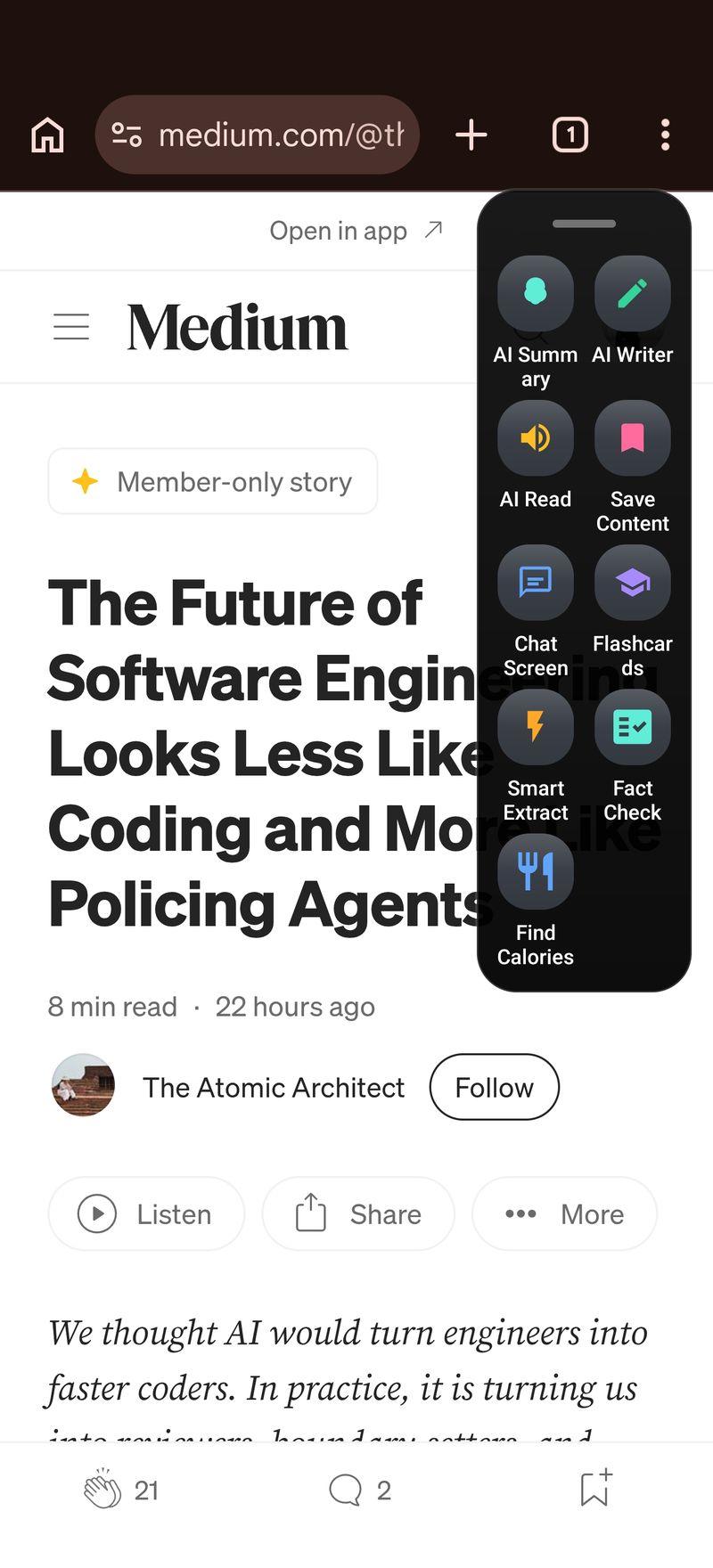
Why Arc reads your screen when other apps can’t
Arc uses Android’s accessibility layer to see the text currently displayed — selectable text, images with words in them, even video frames. So the AI summary works on things paste-based tools can’t even see: a screenshot of a long chat, a slide from a video, a photo of a whiteboard.
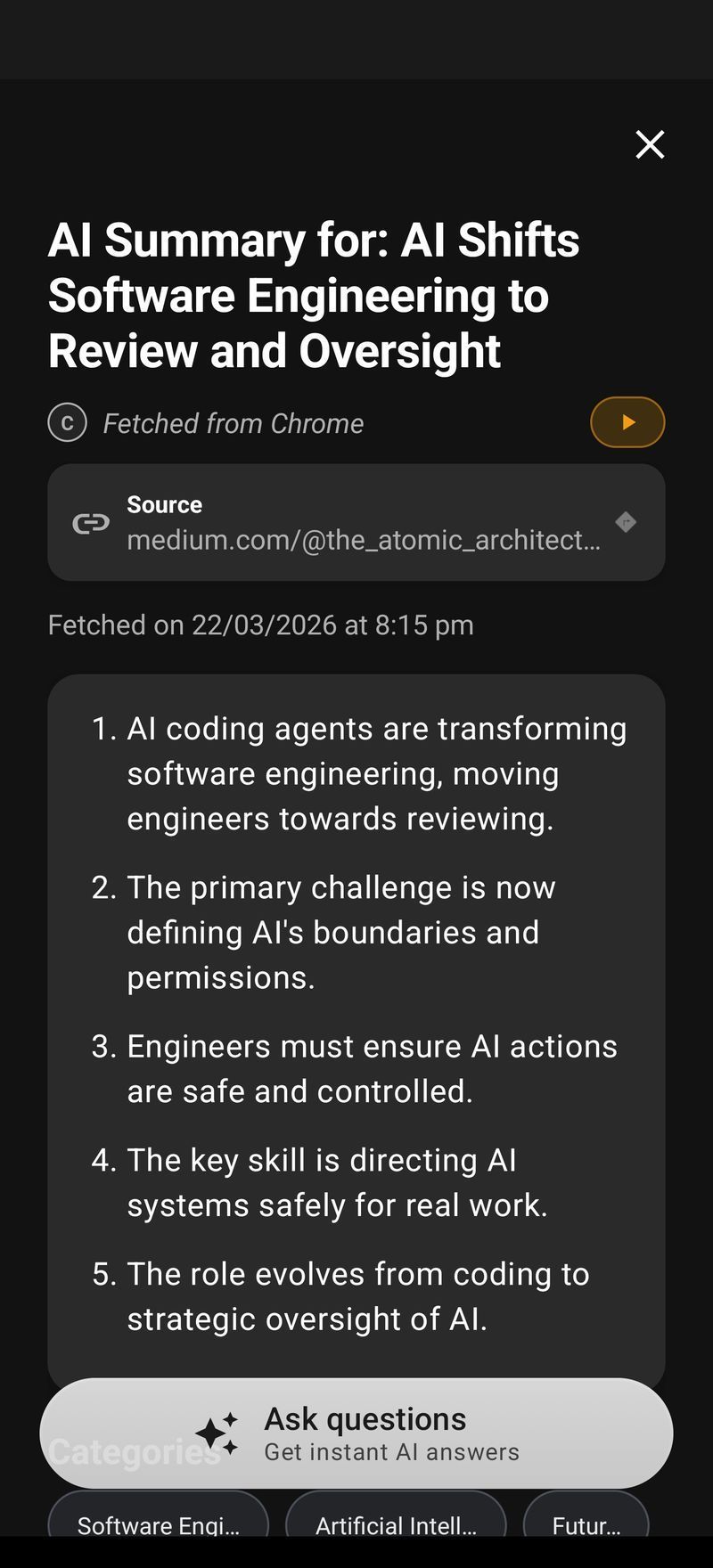
What you get is not just a summary. The result panel gives you:
- Bullet-point takeaways in seconds
- A paragraph version when you need flowing prose for notes
- An “explain simply” option for dense academic or legal text
- A chat that stays in context — ask “what did the author recommend?”, “what’s the catch?”, “compare this to the first section” without pasting anything
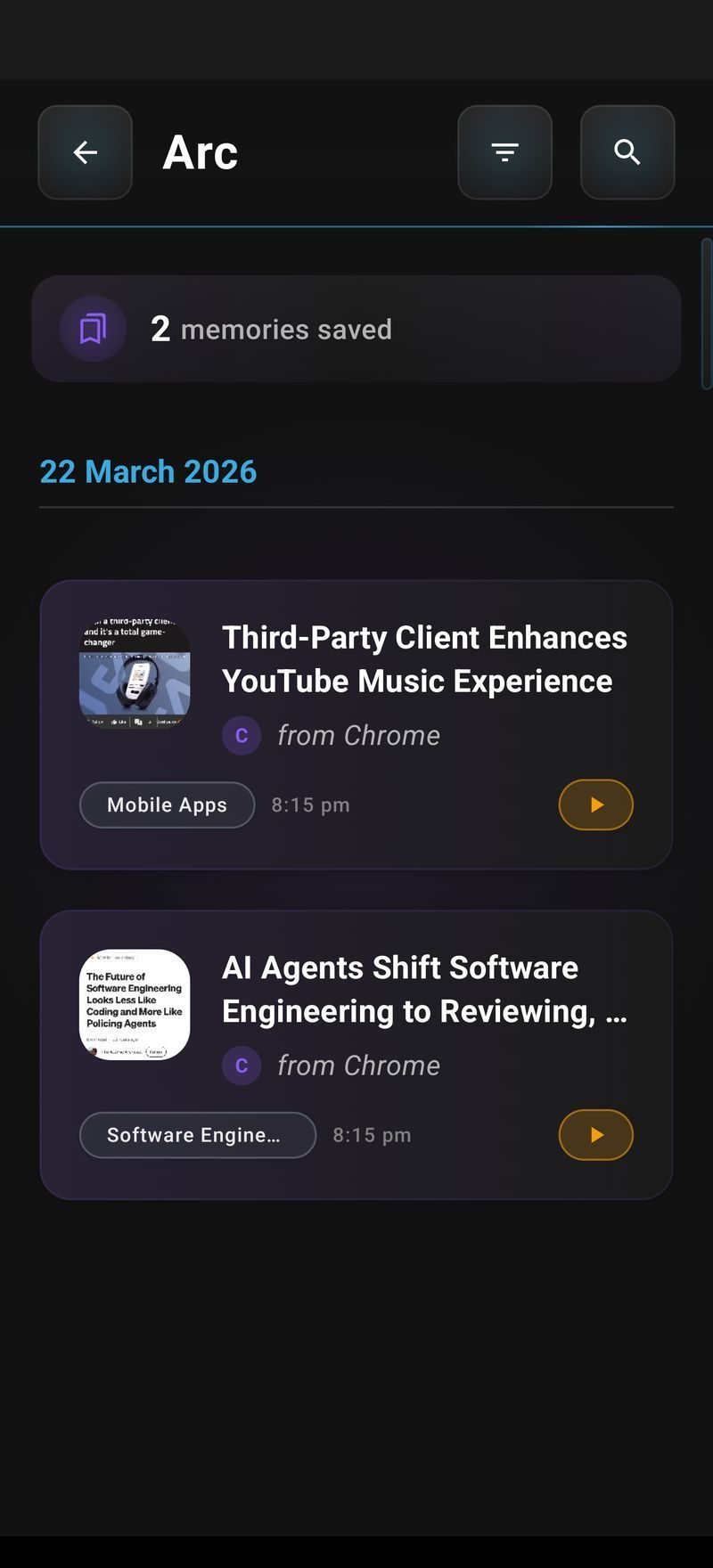
Every summary you make lands in a summary library so you can go back and re-read or re-ask later — the same engine behind Arc’s AI Summary & Reader feature page.
Trade-off: Arc does a lot — summaries, rewriting with its AI Writer, replies, text-to-speech, custom AI actions — so there’s more to explore than a single-purpose summarizer. If you want one feature only, options 4–7 below are more focused. If you want one app that replaces five, this is it.
Platform note: Arc also runs on Mac. Same idea — press Control+Space, a floating panel appears over whatever you’re reading, and you summarize, rewrite, or extract without leaving the window. Android gets the floating sidebar; Mac gets the menu bar icon and the system-wide shortcut.
Best for: people who read and answer text across many apps all day.
Try it: Arc is free on Google Play. The summary feature works on the free tier.
2. Summary — AI Note Taker (best for meetings)
If your summary needs are 90% meetings, Summary - AI Note Taker is the strongest pure play. Record a meeting, get a transcript, get a structured summary with action items. 4.6 stars from 125K+ ratings says it’s doing that one thing well.
Where it falls short for general use: it summarizes conversations you record, not text on your screen. You can’t point it at a Gmail thread or a web article. It’s a meeting tool with a summary feature, not a screen summarizer.
Best for: back-to-back meeting days.
3. Read AI (best for call recaps and scheduling)
Read AI records calls, transcribes, summarizes, and tracks who talked most. The mobile app is solid if your summary workflow is “everything that happens in a meeting.”
Trade-off: like Summary AI, it’s recording-based. No on-screen text summarization. Also pricier once you’re past the free tier.
Best for: teams that live in calls.
4. AI Summarizer — Summary AI (best simple free pick)
The straightforward pick. Paste text, choose length, get a summary. It’s fast, it’s free, it’s honest about what it is.
Trade-off: copy-paste only — if the text is on your screen, you do the copy-paste work yourself. Some users report ads on the free tier.
Best for: occasional paste-and-summarize jobs.
5. QuillBot (best for students at a desk)
QuillBot’s summarizer is excellent — key-sentences mode vs paragraph mode, adjustable length. It’s web-based, so “app” means a Chrome tab. On a phone it works, but it’s a browser tool, not an app that sees your screen.
Best for: essays and papers when you’re already at a keyboard.
6. Notion AI (best if you already live in Notion)
Notion AI summarizes pages inside your workspace. If your reading and notes already happen in Notion, it’s convenient. As a general-purpose pick it’s constrained to Notion content — you can’t summarize Gmail or a PDF in another app.
Best for: Notion users summarizing their own docs.
7. Perplexity (best for summarizing web answers)
Perplexity summarizes the web with citations when you ask a question. It’s a research tool with summarization at its core, not a screen summarizer — you’re inside Perplexity’s app the whole time.
Best for: question-style research, not summarizing what’s in front of you.
Quick comparison: every AI summary app Android has right now
| App | Screen-aware | Works across apps | Summary styles | Free tier |
|---|---|---|---|---|
| Arc | ✅ | ✅ | Bullets, paragraph, ELI5 + chat | ✅ |
| Summary - AI Note Taker | ❌ | ❌ | Meeting recaps | ✅ |
| Read AI | ❌ | ❌ | Call summaries | ✅ |
| AI Summarizer | ❌ | ❌ | Paste-only, 3 lengths | ✅ (ads) |
| QuillBot | ❌ | ❌ | Sentences/paragraph | ✅ |
| Notion AI | ❌ | ❌ | Notion pages only | ❌ |
| Perplexity | ❌ | ❌ | Web answers | ✅ |
How to use the best AI summary app Android has: step by step
Tutorial portion, since this is the part I get asked about most:
- Install Arc from Google Play.
- Grant the two permissions — accessibility service and draw-over-apps. One-time setup, takes under a minute.
- Open whatever has text — Gmail, Chrome, a PDF, even a photo of a whiteboard.
- Tap the floating sidebar on the screen edge.
- Tap Summarize. Arc reads the visible text — no copying.
- Pick the format you want from the result panel.
- Ask follow-ups in the same panel — “explain the third point”, “what’s missing here?”
- Save it — the summary goes to your library, tagged by app and date.
The same flow on Mac: Control+Space
On Mac it’s even faster: press Control+Space anywhere, and a floating panel appears over your current window — no sidebar, no mouse gymnastics. Hit Summarize and the panel reads what’s on screen. Arc for Mac and Arc for Android share the same summary engine, so summaries saved on one show in your library on the other.
FAQ
Which is the best AI summary app Android users should pick in 2026?
For summarizing text that’s on your screen across any app, Arc is the strongest pick — it reads what’s visible without copy-paste and offers multiple summary formats. If your summaries are mostly of meetings you attend, a recording-based tool like Summary - AI Note Taker fits better.
Is there a free AI summary app Android users can trust?
Yes. Arc’s summary feature works on the free tier, and AI Summarizer — Summary AI is free paste-only. Watch the free tiers of recording-based apps — most cap monthly minutes.
How does an AI summary app Android users love actually read the screen?
It uses the Android accessibility service to read the text currently displayed by any app, sends it to an AI model, and shows the result in a floating panel. Arc does this via a floating sidebar you tap once — you never leave the app you’re reading in.
Can an AI summary app Android tool handle images or screenshots?
Arc can — it processes what’s visually on screen, not just selectable text. So a screenshot of a long chat, a slide from a video, or a photo of a document can be summarized. Most paste-based tools can’t.
Do these apps work offline?
No serious AI summary app for Android works fully offline — the summarization runs on cloud models. Arc processes requests server-side and doesn’t store your screen text beyond your saved summaries.
The one-question test
If you’re choosing between these, ask one thing: when you hit Summarize, does the app already know what’s on your screen?
Five of these seven apps need you to paste text into them. That’s a desktop habit that never made sense on mobile. The best AI summary app Android has right now is the one that already sees your screen — across every app on your phone, and now on your Mac too with the same Control+Space shortcut every time.
Try Arc free on Google Play. If it doesn’t save you time on the first article you summarize, uninstall it — but give the sidebar a day first.