
AI Writer and Reply Generator
Rewrite a draft, fix its grammar, translate it, or answer the message in front of you — inside WhatsApp, Gmail, Slack or any other text field, on Android, Mac and Windows. Arc writes the result back where your cursor was, so there's nothing to copy or paste.
How the AI Writer works
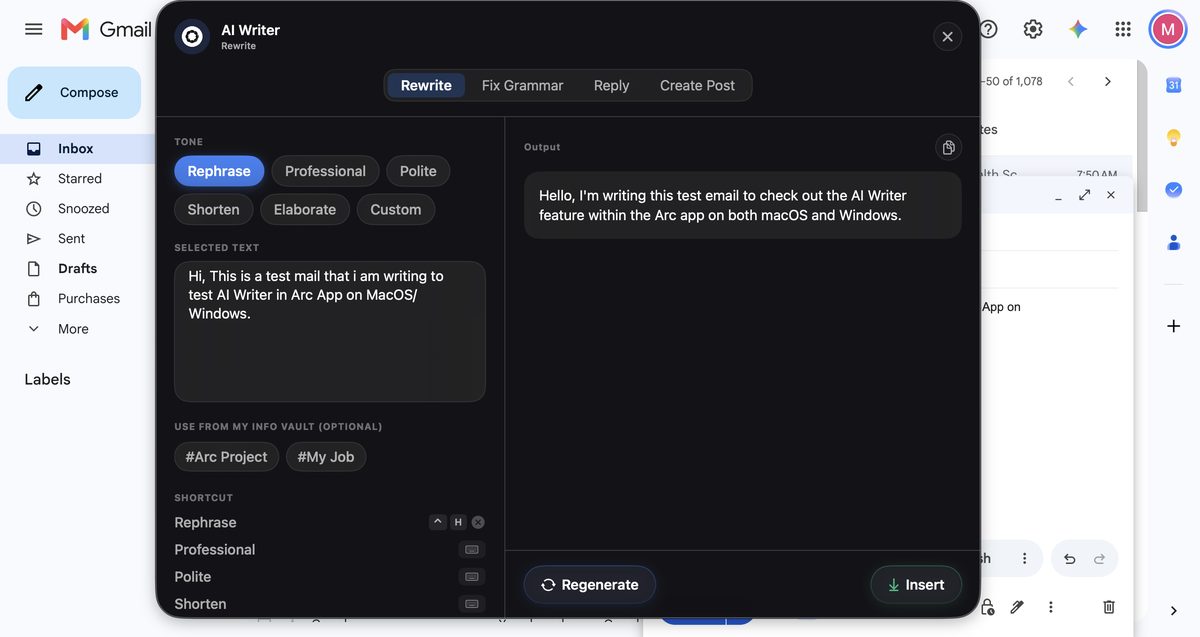
Arc AI Writer lives in the floating sidebar on Android and behind Control+Space on Mac and Ctrl+Space on Windows. It reads the text in the field you’re in, rewrites it, and writes it back — no copy-paste into another app. Here is the real flow on a rough Gmail draft:
1. Invoke Arc over the draft
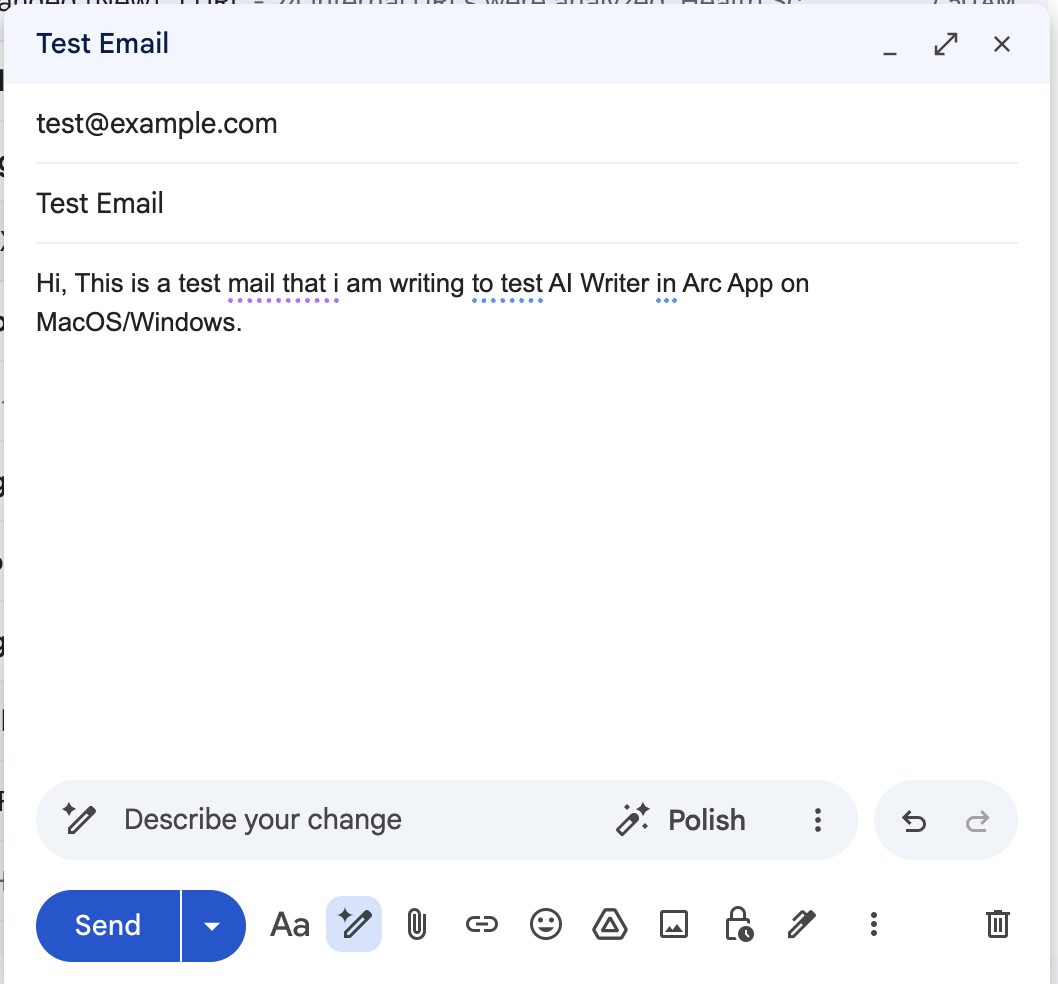
Your draft: "Hi, This is a test mail that i am writing to test AI Writer in Arc App on MacOS/Windows." Press Control+Space (Mac), Ctrl+Space (Windows) or swipe the edge (Android) and pick AI Writer. Arc auto-fetches the focused field's text into the SELECTED TEXT box without stealing focus.
2. Pick a tone and generate
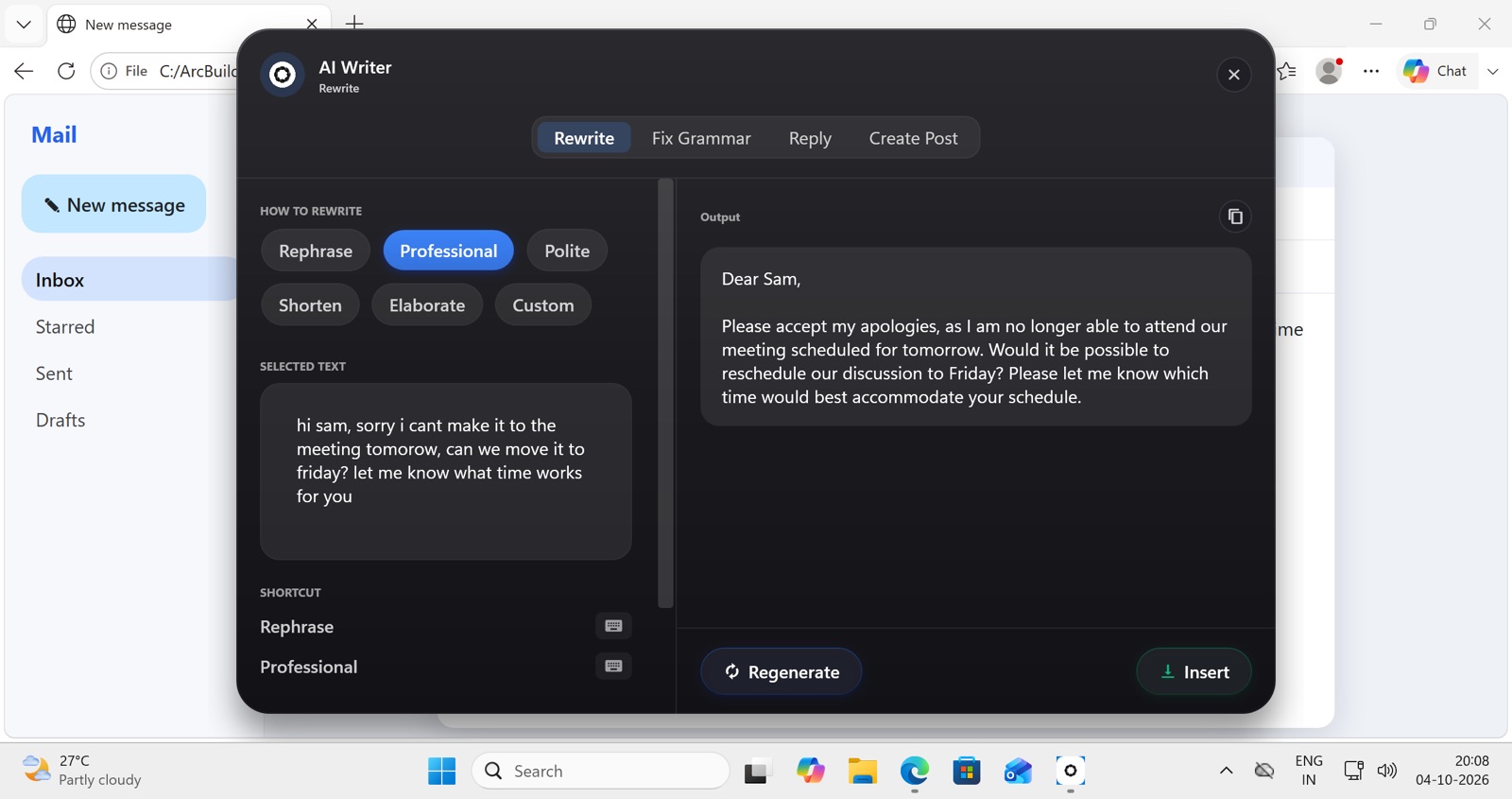
Choose Rewrite, then a tone: Rephrase (fresh wording), Professional, Polite (softens a blunt message), Shorten, Elaborate (two lines into a full message), or Custom — any instruction, like "make it apologetic". Not right? Tap Regenerate or step back through the generation history.
3. Insert
Tap Insert and the polished text replaces your draft exactly where the cursor was. Hit send.
The same flow on Windows, rewriting a mail draft:
What each mode returns
Each mode is tuned for a different job, and the difference shows up in what comes back:
| Mode | You start with | You get back |
|---|---|---|
| Rewrite | “hey so i cant make the 3pm, something came up, sorry” | The same message in the tone you picked, with the meaning and the facts unchanged |
| Grammar fix | A paragraph with typos and comma splices | The same paragraph, same voice, with the mistakes corrected and nothing else touched |
| Reply | A message thread on screen | A draft answer that reads the thread first — see replies below |
| Translate | Text in any of the supported languages | The translation with tone preserved — a casual message stays casual |
| Create post | A rough idea or a link | A short-form post shaped for the platform, with variations to pick from |
Rewrite keeps your facts: it will turn “can’t make 3pm” into “I’m unable to attend at 3:00 PM,” but it will not invent a reason you didn’t give it.
Save the rewrites you run every day
The built-in tones cover most fixes, but daily users end up with a few instructions they repeat — “shorten to one line for a status update”, “rewrite as a three-bullet update, lead with the outcome”, “confident but not aggressive”. Save each once as a custom action and it becomes a one-tap button, instead of a Custom instruction you retype.
Replies: five intentions, one tap each
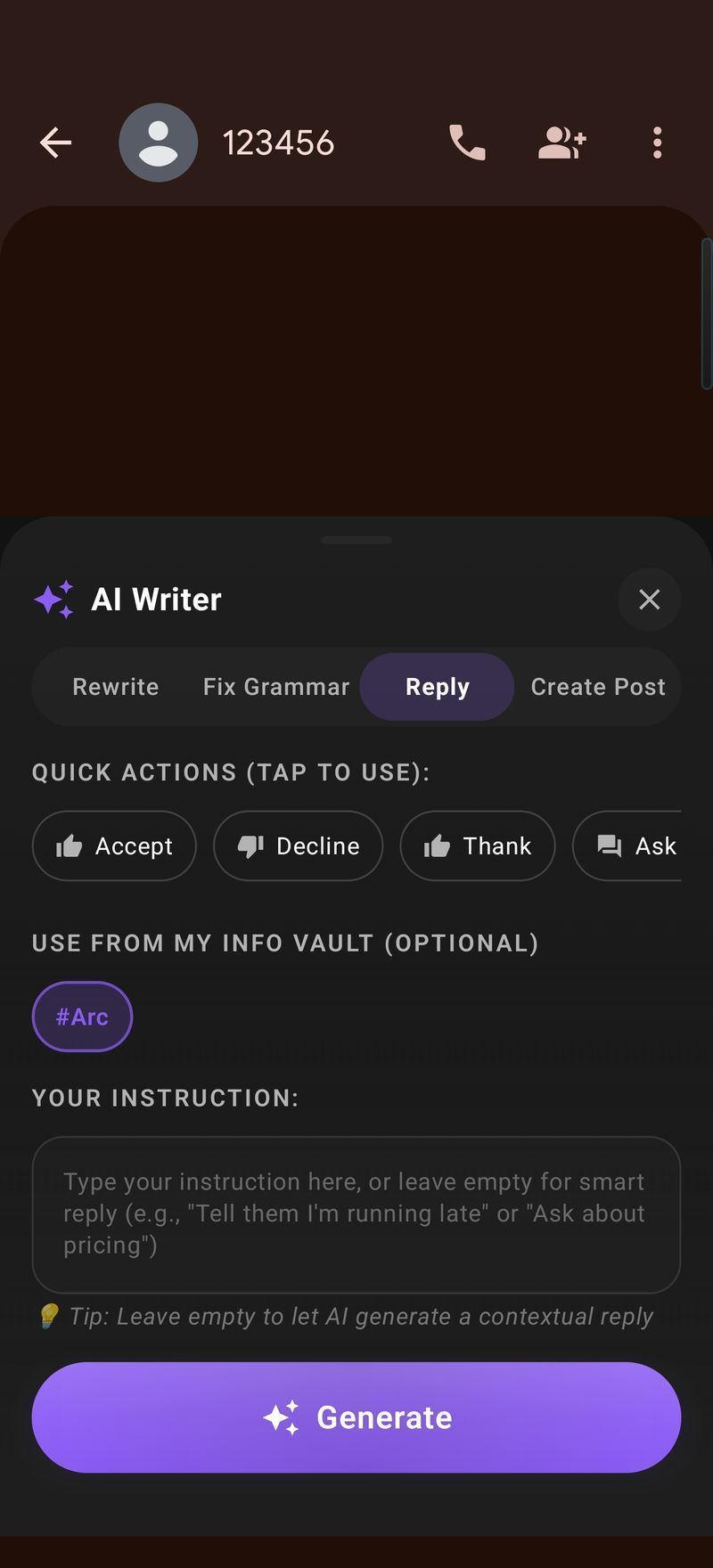
Open the message in WhatsApp, Gmail or Slack, invoke Arc (edge swipe on Android, Control+Space on Mac), choose AI Writer → Reply, and tap an intention. Arc reads the message on screen, drafts the response, and Insert writes it into the reply field.
| Intention | When to use it | What Arc writes |
|---|---|---|
| Yes / Agree | Confirming a plan, accepting an invite | A warm confirmation with the details echoed back |
| No / Decline | Turning something down politely | A clear, courteous no |
| Thank | Someone helped, sent, or hosted | A genuine thank-you with a specific callback |
| Ask for details | The message is vague or missing info | A focused question asking exactly what’s missing |
| Acknowledge | Just let them know you saw it | A brief “got it, will circle back” — no over-promising |
A draft that needs a different register can go straight through one of the rewrite tones above.
It knows which side of the thread you’re on
Paste-the-message tools reply to one message with no memory of what came before, and often from the wrong side of the conversation. Arc reads the visible thread and works out who said what: in WhatsApp and Telegram by bubble alignment (left is them, right is you), in Gmail from the flow of the conversation. It copes with quoted email threads, nested comments and right-to-left scripts like Arabic, Hebrew, Urdu and Persian. A context preview shows exactly what was captured before you generate. If your cursor is already in the reply box, anything you’d started typing is pulled in too.
In practice: a WhatsApp thread ending in “Want to grab coffee at 3pm today?”, one tap on Agree, and two to three seconds later — “Yes, perfect! I’ll be there at 3pm. See you then!”
Replies that sound like you
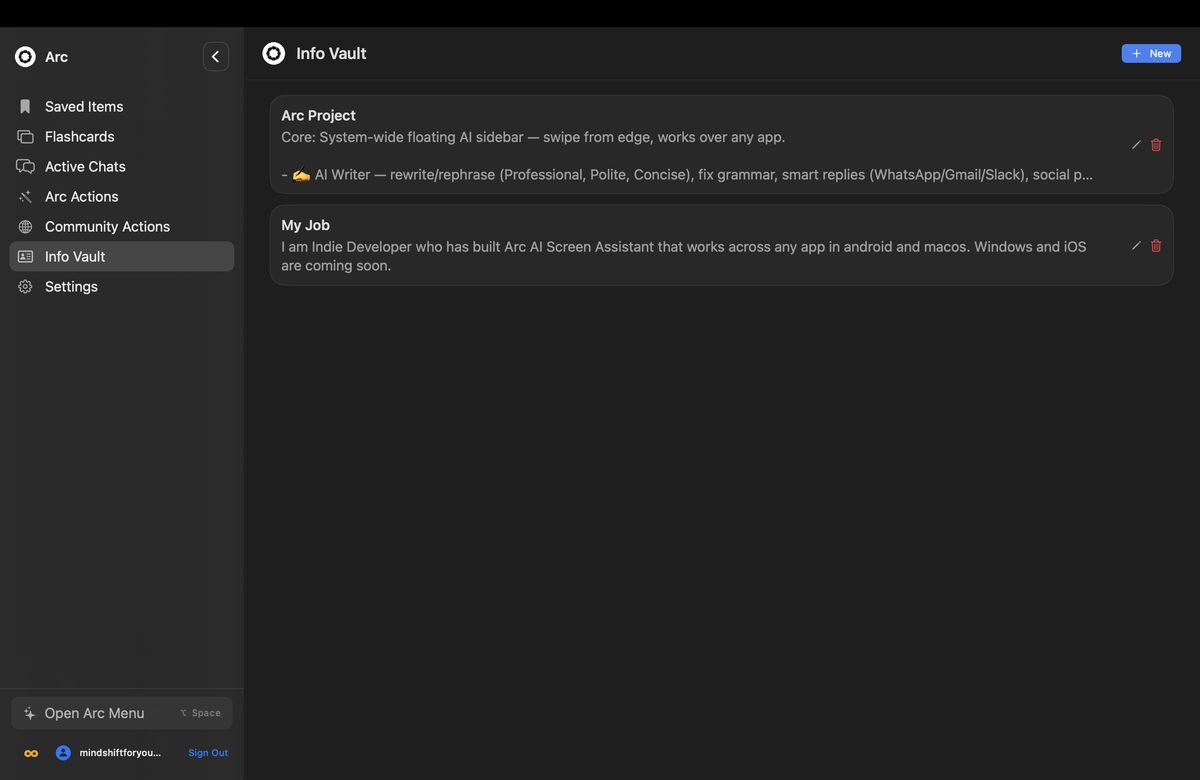
The My Info Vault stores your name and title, company, tone preferences and sign-offs once; they appear as optional chips in every reply — include them for a full signature, skip them for one-liners. Entries are stored locally on your device and only leave it if you opt in to Drive backup; with two devices, backups merge instead of overwriting.
Keyboard-speed fixes on desktop
On Mac and Windows, bind any sub-action to a global shortcut — Control+R for Rephrase by default — and fix a text field without opening the Arc panel. It even works in terminals and Electron apps. More on that in AI shortcuts and custom actions.
| Works inside | Android | macOS / Windows |
|---|---|---|
| WhatsApp / WhatsApp Web | ✅ | ✅ |
| Gmail / Outlook | ✅ | ✅ |
| Slack / Teams | ✅ | ✅ |
| Any text field, any app | ✅ | ✅ |
| Write back into the field | ✅ Insert | ✅ Insert |
| Per-action keyboard shortcut | — | ✅ ⌃R style |
How it compares to what’s already on your phone
- Gboard’s built-in proofread is free and instant — the right tool for a typo. It fixes; it does not rewrite, reply, or translate with tone.
- The Grammarly keyboard is strong on grammar and style, but as a keyboard it acts on what you type, not on what’s on screen around it.
- QuillBot and browser rewriters are good for long documents on a desktop. On a phone they mean leaving the app, pasting, copying and pasting back — five or six steps for a two-line fix.
- Pasting into ChatGPT or Gemini gives you the most capable model for long-form work, at the cost of an app switch and two pastes every time.
- Arc’s AI Writer reads the screen, so it can answer a message it can see and return you to the app you were in. It is not a live as-you-type grammar engine, and for a 2,000-word draft you want a full chat interface.
Setup and pricing
Setup is two permissions — accessibility, so Arc can read screen text, and display-over-other-apps, so the sidebar can float — granted from onboarding in about two minutes. Arc disables itself automatically in around 400 sensitive apps, including banking, crypto and password managers, and you can add your own exclusions.
The free tier is 7 requests per week. Premium removes the cap and covers Android, Mac and Windows on one subscription. No ad tier, no expiring trial.
Frequently asked questions
Does it work in every app?
Yes. The AI Writer works across all Android apps with text fields, including email clients, messaging apps, social media, browsers, notes apps, and more.
What languages are supported?
Arc's app interface and AI features support 9 languages: English, Spanish, German, French, Portuguese (Brazil & Portugal), Korean, Japanese, and Indonesian. Translation and writing assistance work across many additional languages.
Can I choose the tone of the rewrite?
Yes. Pick Rephrase, Professional, Polite, Shorten or Elaborate, or type a Custom instruction for any other tone — casual, persuasive, apologetic.
Does the AI Writer store my text?
No. Text is processed for AI responses but never stored on our servers. Your content stays private and is not used to train models.
Can it make AI-generated text sound human?
Yes. If a chatbot draft reads robotic, run it through Rewrite with Rephrase or a Custom instruction like "casual and plain" and the stiff phrasing gets reworked. If you only want errors repaired, Fix Grammar keeps the wording as is.
Can it rewrite text I can't select or copy?
Usually. Arc reads the visible screen rather than the clipboard, so text that's awkward to select on Android — a preview pane, a PDF viewer, part of a web page — is still workable. For very long documents, capture the relevant section or condense it first with AI Summary.
Does the reply generator read my whole conversation?
It reads the visible thread on your screen so the reply fits the context — who asked what, and how the conversation has gone. The expandable context preview shows exactly what was captured, and nothing is generated until you tap to generate.
Can I fix grammar without opening the panel?
On desktop, yes — bind Fix Grammar (or Rephrase) to a global shortcut like Control+R. Cursor in the field, press the key, the text is corrected in place.
Try the AI Writer free
Rewrite, reply, and polish text in any app on Android, Mac and Windows

Related features
- AI Summary & Reader - Summarize and listen to any content
- AI Shortcuts & Custom Actions - Save your own prompts as one-tap actions
- Private AI Assistant - Exactly what text goes where
Available platforms
- Arc for Android - Download now from Google Play
- Arc for iOS - In development
- Arc for Mac - Available now, free download
- Arc for Windows - Free on the Microsoft Store