
AI Assistant for Windows
Press Ctrl+Space in any Windows app and Arc reads that window — summarizes it, reads it aloud, rewrites your text, or runs a prompt you wrote yourself.
Also on Mac →The quiet return of local-first software
For fifteen years the default answer was the server. Your documents lived somewhere else, your edits were round trips, and an aeroplane was enough to make the tool useless.
Local-first inverts that. The device holds the real copy; the network is a synchroniser, not a landlord. Conflict-free replicated data types made the merge tractable, and cheap local storage made the rest obvious.
AI Summary
inkandatoms.comFor fifteen years software defaulted to the server — documents lived remotely and every edit was a round trip.
Local-first inverts the relationship: the device holds the authoritative copy and the network merely synchronises it.
CRDTs made conflict-free merging practical, while cheap local storage removed the last reason to centralise.
The tradeoff moves to sync infrastructure: teams own the merge semantics they used to rent from a database.
The pattern pays off where offline use is a real requirement, not an aesthetic one.
What Arc for Windows Is
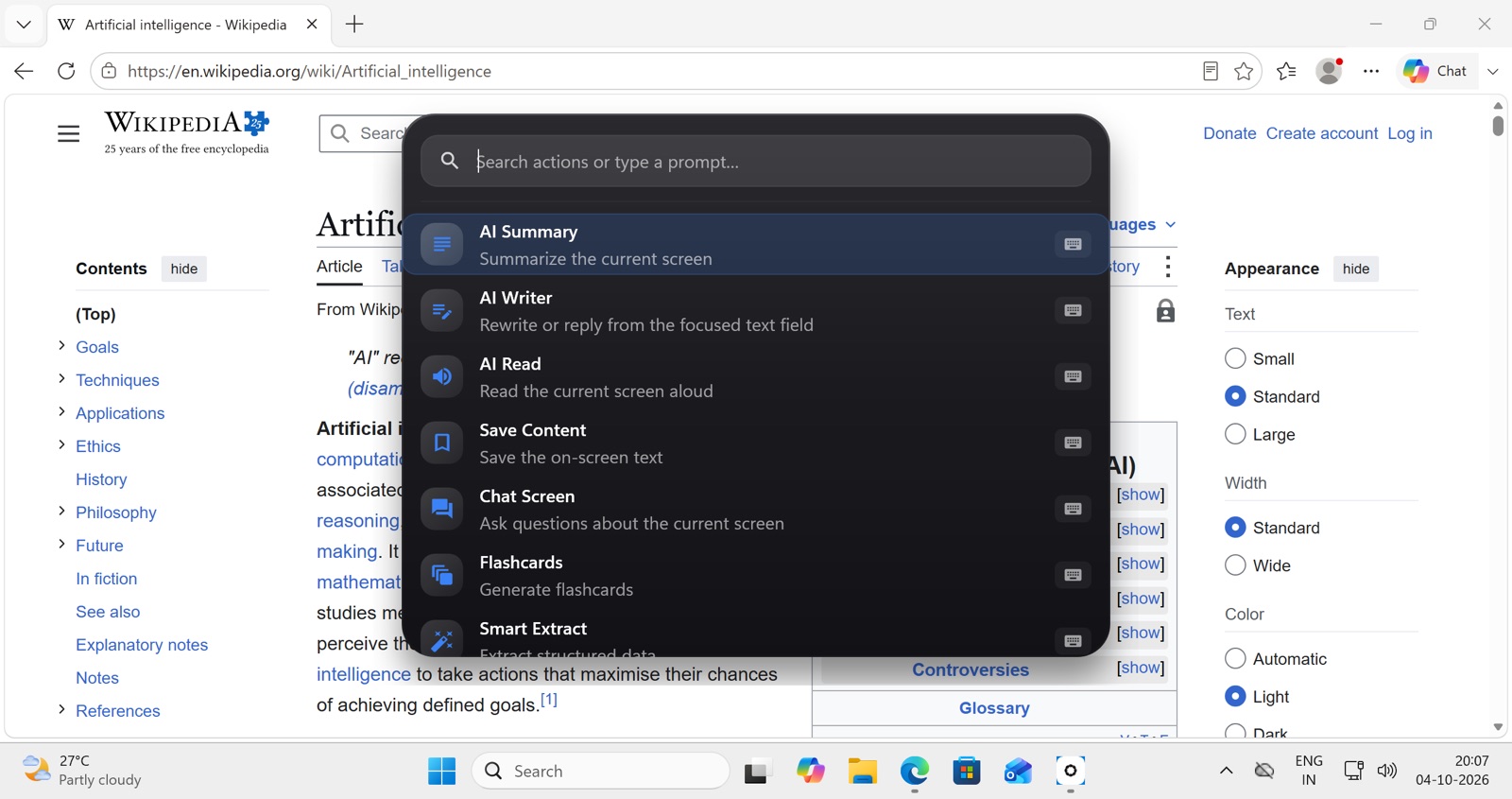
Arc is an AI assistant for Windows that works on the window you are already looking at. You press Ctrl + Space, a search panel appears over your current app, and every action — summarize, read aloud, rewrite, chat, extract — runs against the text in that window. Nothing is copied, nothing is pasted, and you never switch to a separate chatbot tab.
It’s a free download from the Microsoft Store for Windows 10 and 11.
What’s in the Ctrl+Space menu
The panel lists seven built-in actions — AI Summary, AI Writer, Save Content, AI Read, Chat Screen, Flashcards, Smart Extract — and the search field doubles as a free-text prompt box. Each action can be reordered, disabled or bound to its own global shortcut. Esc dismisses the panel with no residue.
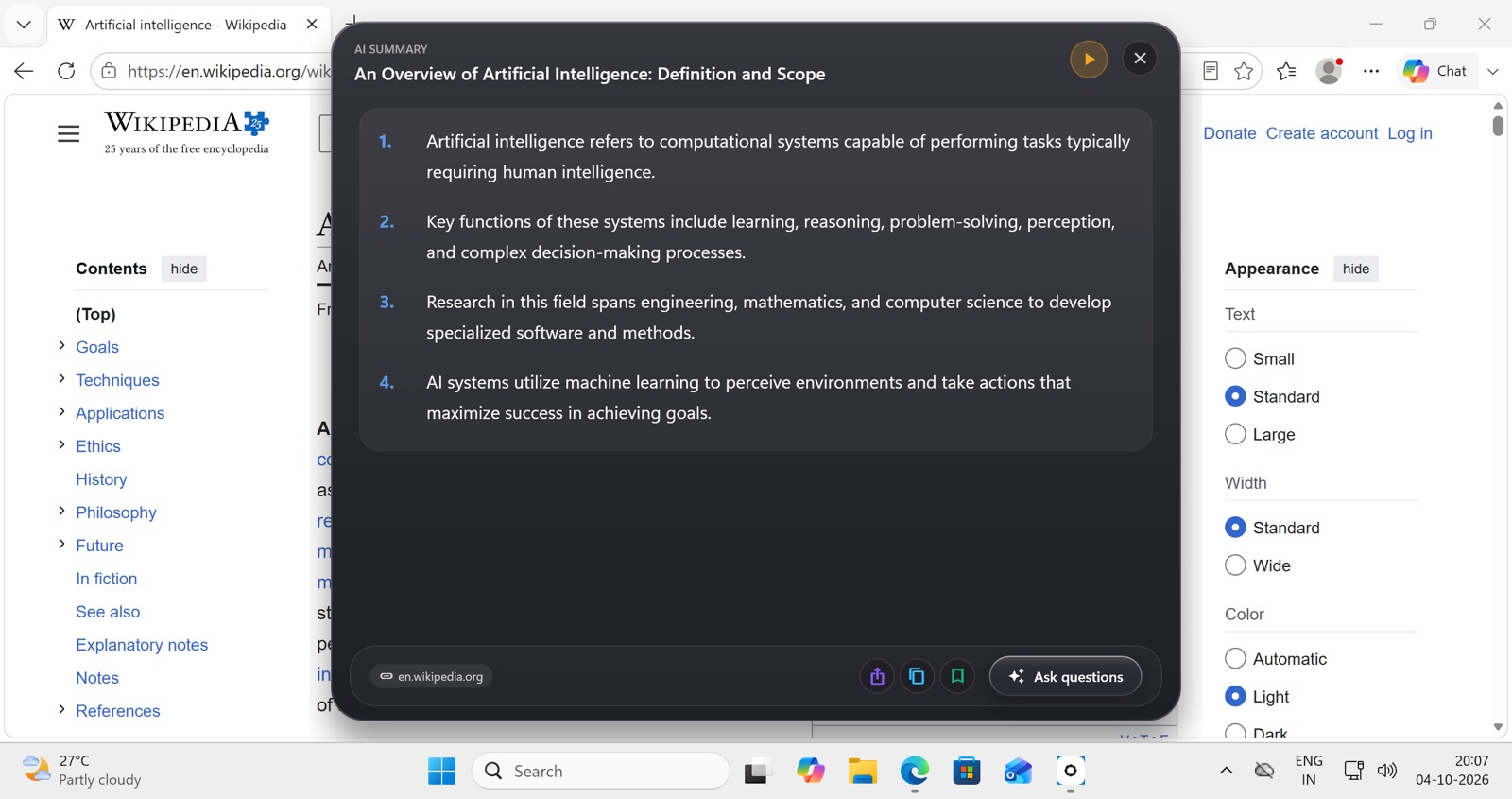
- AI Summary returns an AI-generated title, numbered key points and a source chip in a couple of seconds, with Listen, Copy, Share, Save and Ask questions underneath.
- AI Read opens no window at all: Arc detects the on-screen language, picks the best installed voice and starts reading. Lists are spoken as separate points with pauses, and invoking it again stops playback.
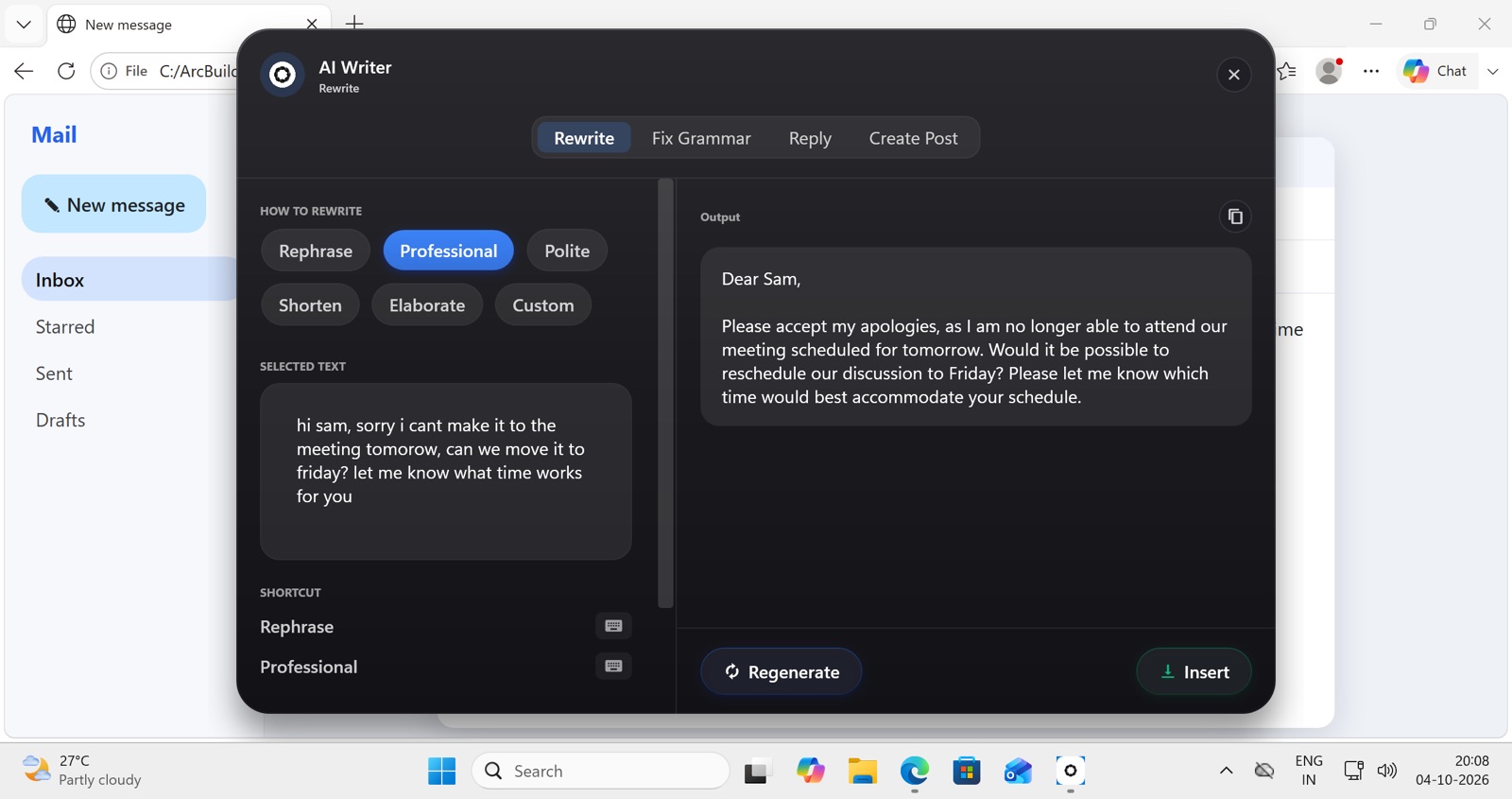
- AI Writer pulls the draft from whatever field your cursor is in and offers four modes: Rewrite (Rephrase, Professional, Polite, Shorten, Elaborate, Custom), Fix Grammar, Reply (Agree, Decline, Thank, Ask for details, Acknowledge) and Create Post for Reddit, X, LinkedIn and store reviews. Insert writes the result back into the original field.
- Arc Actions are your own prompts with a
{screen_text}placeholder — “extract every action item and deadline from this thread”, “turn this error message into a bug report” — bound to a hotkey and run headless against the current window. The community catalog is filterable by language.
Install from the Microsoft Store.
Open the Store listing and click Get. No installer to download and no admin prompt.
Arc settles into the system tray. Turn on "start with Windows" if you want it ready after every reboot.
Open Word, Outlook, Edge or a PDF and press Ctrl+Space. The panel reads that window straight away.
The panel, the summary, the rewrite.
These were captured on a Mac. The Windows build uses the same interface, with Ctrl in place of ⌃.
How Arc Works on Windows
Arc reads the frontmost window through the Windows UI Automation framework — the same accessibility layer screen readers use — so the content is already there when the panel opens.
That covers UWP apps, legacy Win32 software, browsers, Office, PDF viewers and Electron apps like Slack and Teams. The panel is non-activating, so the app underneath keeps focus. The Store installs Arc per user with no administrator rights and keeps it updated; it runs from the system tray and can start with Windows.
Windows vs. Mac: what actually differs
Same codebase, same features. Only these differ:
| macOS | Windows | |
|---|---|---|
| Summon hotkey | ⌃ Space | Ctrl + Space |
| Screen reading | Accessibility API | UI Automation |
| Permissions | Accessibility + Screen Recording prompts | No equivalent prompt; works as installed from the Store |
| Background home | Menu bar | System tray |
Your own prompts with hotkeys are covered on AI workflow automation; for sensitive work, see the private AI assistant setup.
Also on Mac and Android
The same Arc, with one subscription across every platform you use.
Arc for Windows FAQ
Does Arc for Windows need administrator rights?
No. The Microsoft Store installs Arc per user, so it works on PCs where you can’t install software as an administrator, as long as the Store is allowed.
What if Ctrl+Space is already taken on my PC?
Some input methods use Ctrl+Space to switch languages. Open Arc’s Settings, record a different key combination for the Arc menu, and the new shortcut takes over system-wide.
Where can I download Arc for Windows?
From the Microsoft Store. It installs and updates like any Store app, runs on Windows 10 (version 1809 or later) and Windows 11, and supports both Intel/AMD and Arm PCs.
How much does Arc for Windows cost?
Arc is freemium. The free tier gives you 7 requests per week on basic features, and a premium subscription unlocks unlimited summaries, text-to-speech, AI chat and workflow automation. Pricing is identical on every platform — there is no Windows-specific upsell.
How is Arc different from Copilot in Windows?
Copilot answers questions in its own panel, so you paste content into it. Arc runs on whatever window is already in front of you — press Ctrl+Space and it reads that window directly. You can also bind your own prompts to global hotkeys, which Copilot does not offer.
Does Arc for Windows need an internet connection?
Yes. AI summaries, chat and rewriting are processed by a hosted model, so Arc needs a connection for those. Your saved items, custom actions and Info Vault entries are stored locally on your PC.
Apply your invite code.
Once Arc is installed, open it with your code attached — you'll both get Arc Pro free when you subscribe.
Code . You can also enter it by hand in Settings → Refer a friend.