
Best AI Summarizer App Android: 7 Ranked & Tested
I keep a folder of five deliberately awful texts on my phone: a 28-page PDF chapter on data-privacy law, a Gmail thread with 19 replies that could have been two, a 4,000-word Substack essay, the transcript of a 40-minute meeting, and a Reddit thread where the answer is buried in comment #37.
Every time a new summarizer shows up on the Play Store, I run those five through it and time the result. That exercise is how I settled this list. I went in with one question: which is the best AI summarizer app Android users can actually keep — not download, admire for a week, and quietly uninstall?
Short answer: Arc AI Screen Assistant wins for everyday reading, because it works on whatever is already on your screen without a copy-paste loop. There are four other cases — meetings, lectures, academic papers, one-click web articles — where a specialist beats it, and I’ll tell you exactly when to reach for each.
How I picked the best AI summarizer app Android has right now
Ranking summarizers is mostly theater when the comparison screenshots are hand-pasted. So here is my actual rubric, in order of weight:
- No copy-paste loop. If I have to select text, copy it, switch apps, and paste, the tool loses points fast. Reading happens in Chrome, Gmail, Drive, PDF viewers, Reddit — the summarizer should meet me where the text already is.
- Speed under load. A summary of a 28-page chapter is worthless if it takes 45 seconds or truncates at page six. The best AI summarizer app Android has ever shipped is the one you stop thinking about — tap, wait two seconds, read.
- Follow-up questions. A summary answers “what does this say.” A good one lets me ask “what did they say about retention penalties?” without regenerating everything from scratch.
- A place to keep results. Summaries you can save, search, and listen to later — not a text box that dies when you close the app.
- Honest pricing. A free tier that does the core job, and clear limits before you pay.
Five of the seven apps below fail at least two of these. I kept the imperfect ones anyway because they are genuinely good at their niche — the trick is knowing which niche.
The 7 best AI summarizer apps for Android, ranked
1. Arc — the best AI summarizer app Android offers overall
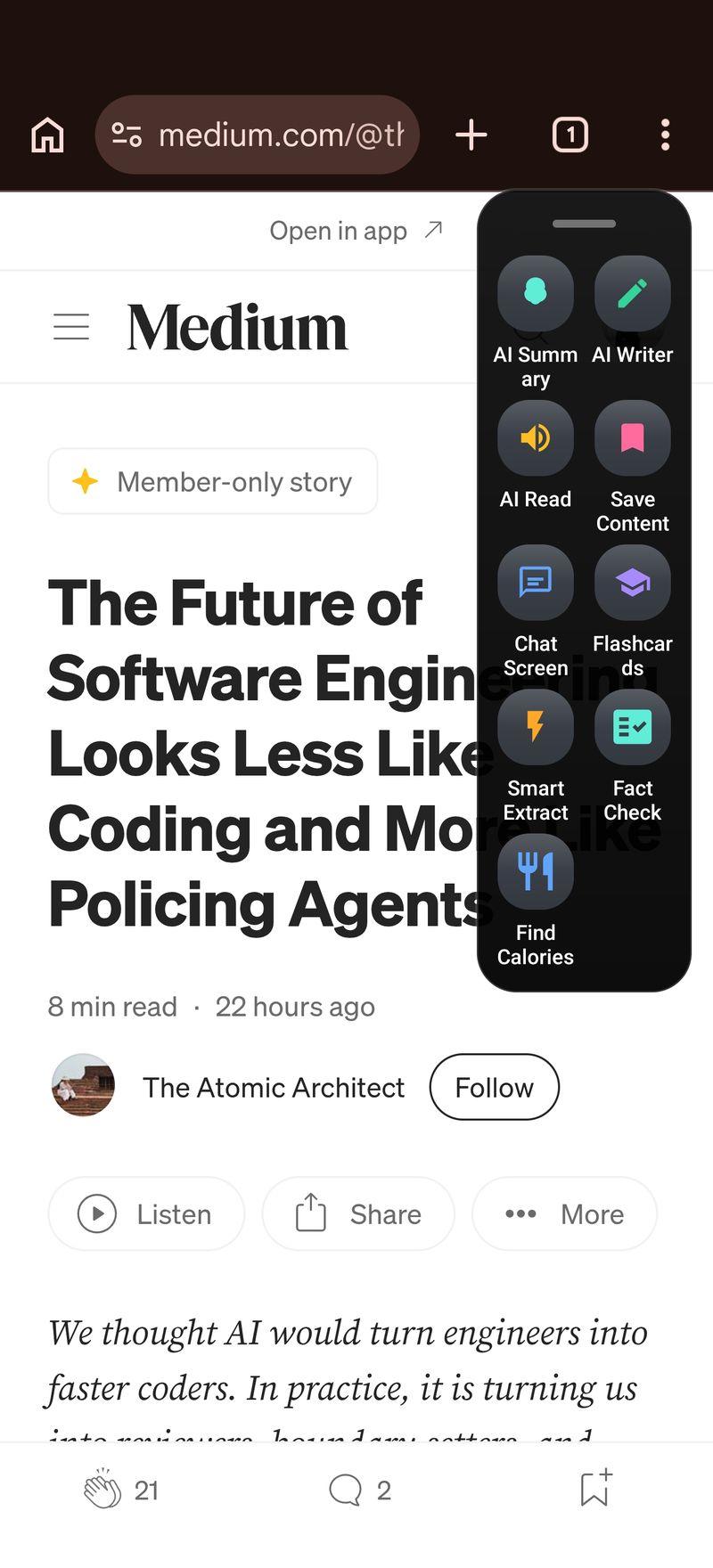
Arc is the only app on this list built around the assumption that the text you want summarized is already on your screen. You are in Chrome staring at that data-privacy chapter: swipe the screen edge, Arc’s floating sidebar opens over the app, tap Summary, and a couple of seconds later the whole thing is distilled — auto-detected as a Document, with the source URL attached for reference.
The details that sold me are after the summary appears, not during. Tap Listen and the summary is read aloud in a natural voice while I walk somewhere. Tap Ask Questions and it chats with the full text as context — I asked what the PDF said about data-retention penalties and got the right two sections cited back. Tap Save and the summary lands in a searchable library with the category, source app, and URL stored.
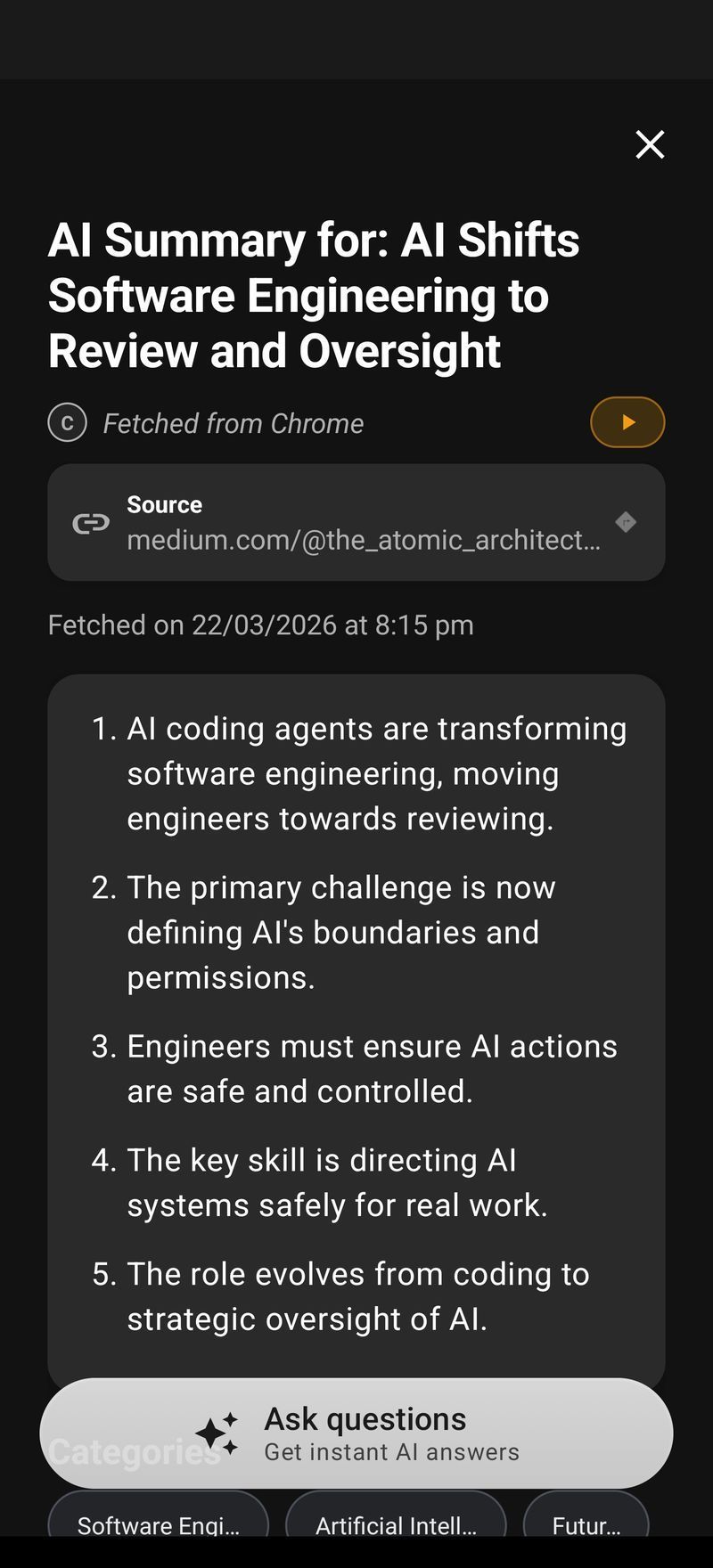
Where it fits, concretely:
- Summarizes any app’s visible text — browsers, email, PDFs, social feeds, chat threads, code docs
- Handles up to roughly 100,000 characters (about 40,000 words) per capture; my 28-page chapter fit with room to spare
- Works in nine languages, so non-English articles are not a dead end
- Free, with no watermark games or three-summaries-then-paywall nonsense
- Every summary is saved, searchable, and re-listenable — it doubles as a reading queue
What it deliberately does not do: record meetings or ingest YouTube links. If you want the full capability list beyond summarizing — reading aloud, saving, flashcards — the AI Summary & Reader page covers it in detail. Arc summarizes what is visible on screen; if your source is audio or a video URL, use a note-taker app. And if you are weighing the best AI summarizer app Android picks against desktop tools, Arc for Mac runs the same loop with a Control+Space shortcut, so the phone and desktop experience behave identically.
One more thing worth knowing: a summary is often a starting point, not the endpoint. When the next step is replying to that email thread or turning a summary into an announcement, AI Writer picks up from the same captured text — rewrite, reply, or fix grammar without retyping anything.
2. Summary – AI Note Taker — best AI summarizer app Android for meetings
One of the most-rated AI apps on the Play Store (4.6 stars from 135,000+ reviews), and deservedly so — but be clear about what it is: a meeting recorder first and a summarizer second. It records the conversation, transcribes it, and turns it into structured minutes with action items and decisions pulled out. For meetings, it is the best AI summarizer app Android users can keep on a phone.
What it is not: a reader for what is already on screen. If the text lives in a PDF or a browser tab, there is nothing to record — this app cannot help.
3. QuillBot — best paste-in summarizer with a writing suite
QuillBot’s summarizer is the classic paste-in: key-sentences mode or paragraph mode, a length slider that actually responds, and no ads at the free tier. It is part of a suite (paraphraser, grammar checker) that makes it a sensible pick if you also write on your phone. The paste-in tax is real, though — for that 19-reply Gmail thread I had to copy it over in chunks, and the follow-up depth is one regenerating summary after another rather than a real conversation.
4. Summarizer.org — best bare-minimum link summarizer
Drop in text or a URL, pick a mode (short bullets, long bullets, paragraph), get an answer in seconds. It also does keyword extraction, which is occasionally handy. At 3.7 stars on the Play Store it sits in the “works fine, nothing memorable” zone — it is a web wrapper, and the long-document ceiling shows: my PDF chapter came back noticeably lossier than Arc’s version.
5. NoteGPT — best AI summarizer app Android choice for lectures and YouTube
NoteGPT’s trick is ingesting YouTube links and lecture recordings and returning transcripts plus timestamped summaries, with flashcards built in. For students who live in recorded lectures, that is the whole workflow in one app. For everyday reading tasks it is the wrong shape — slow, and it wants a link rather than a screen.
6. SciSpace — best for academic papers
Built for literature reviews: it summarizes papers and lets you interrogate them with domain-aware questions about methodology, sample size, and limitations. If all five of your brutal texts are arXiv PDFs, SciSpace is the specialist worth keeping. For everything else it is overkill and noticeably slower than the generalists.
7. TLDR This — best one-click web-article option
Paste a link, get a clean digest with the key sentences highlighted. No frills, no account dance at the free tier, no library. Good for the Substack-essay case specifically; weak everywhere else on my rubric — no follow-up chat, no history, no screen awareness.
Quick match: which one fits your actual week
The best AI summarizer app Android question comes down to your source material, so here is the matching table instead of a marketing paragraph:
| Your actual reading | Best pick |
|---|---|
| Articles, email, PDFs already open on screen | Arc (free, no copy-paste) |
| Meetings and calls | Summary – AI Note Taker |
| Lectures and YouTube recordings | NoteGPT |
| Academic papers by the stack | SciSpace |
| Paste-and-go, plus paraphrase tools | QuillBot |
| Quick digests from links | Summarizer.org or TLDR This |
If you want the deeper feature-by-feature reasoning on the winner, the AI Summary & Reader page breaks down exactly how the capture and listening flow works.
What to do with a summary once you have it
A summary you cannot do anything with is a party trick. Arc treats each one as an object: it lands in a library you can search, reopen (with the source screenshot and URL stored), listen to, or chat about days later.
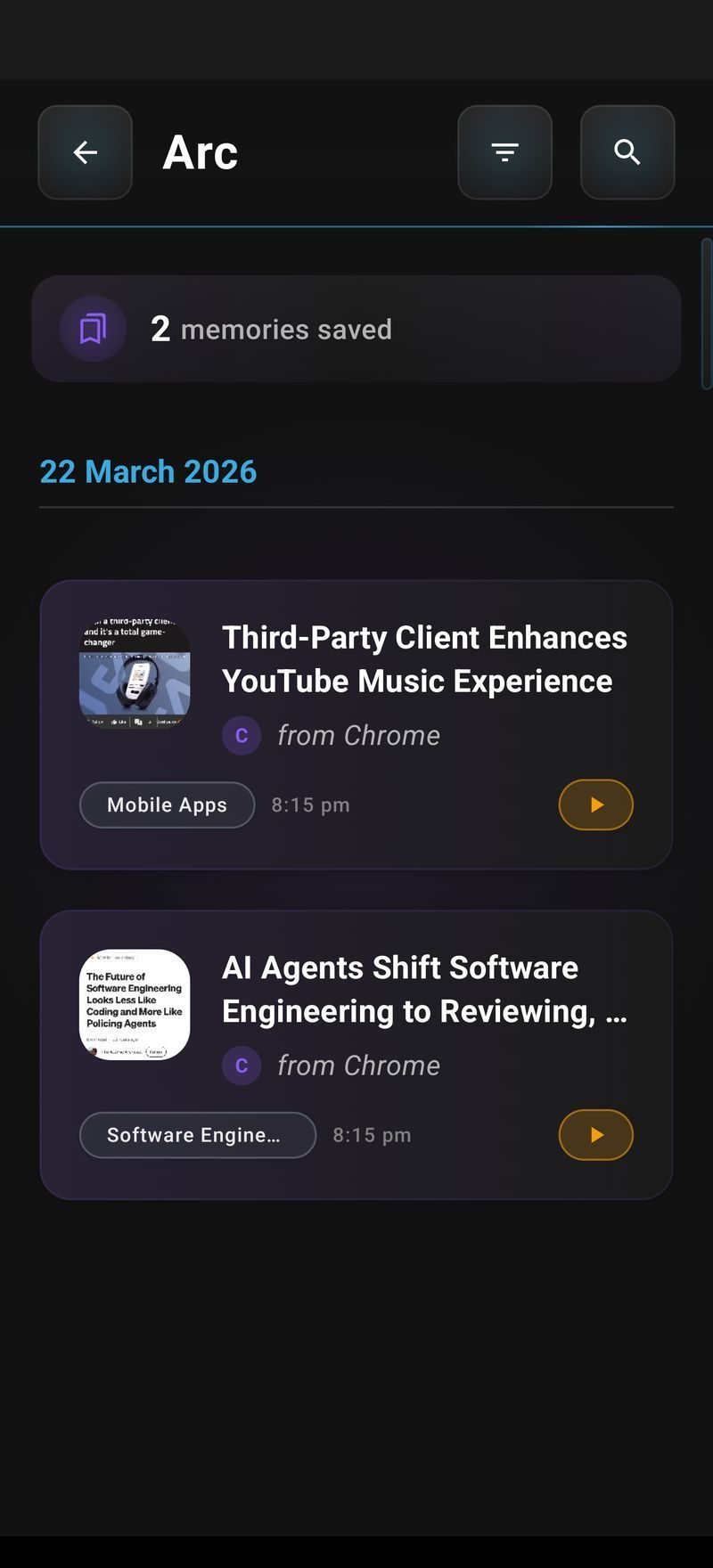
I have quietly made it my reading queue — summarize now on the phone while the tab is open, listen to the saved summary on a walk later. And when a summarize-then-act pattern starts repeating (summarize this sender’s email and draft a reply), that is the moment to stop tapping twice: AI Workflow Automation lets you wrap those steps into a one-tap custom action. My “meeting notes to action items” action took about five minutes to build and now runs daily.
The verdict: the best AI summarizer app Android users should install first
If your reading life is browser tabs, email, PDFs, and social feeds — the standard case — start with Arc. It is free, it works on-screen without the copy-paste loop, and it is the only pick here that keeps your summaries organized after the fact. That is what makes it the best AI summarizer app Android users can actually build a habit around, not just try once.
Then add a specialist only when your source material demands it: recordings (Summary), recorded lectures (NoteGPT), paper stacks (SciSpace). That is my actual setup — Arc daily, a meeting note-taker when there is a call, and nothing else, because storage is finite.
FAQ: best AI summarizer app Android questions, answered
What’s the best free AI summarizer app for Android?
Arc — the screen-aware summarizer, the library, text-to-speech, and follow-up chat are all free, which is why it tops this list. Summarizer.org and TLDR This also have usable free tiers for paste-in jobs if you only need an occasional digest.
Which AI summarizer app is best for students?
For lectures and YouTube recordings, NoteGPT — the timestamped summaries and flashcards map directly to exam prep. For textbooks and PDF chapters you read inside an app, Arc: no copy-paste, and the follow-up chat doubles as a study tool that can quiz you on the section.
Is there an AI summarizer that works without copy-pasting?
Yes — that is the defining feature of Arc. It reads the text visible in whatever app you are in, through its floating sidebar. Every other app on this list is paste-in or link-based, which is exactly the friction Arc removes.
What do Redditors recommend as the best AI summarizer app?
Reddit threads mostly point toward QuillBot and TLDR This for pasted text, and note-taker apps for meetings. Screen-aware options are newer, which is why Arc keeps winning the threads that mention reading directly on screen — the copy-paste-free approach simply matches how people actually read now.
Can an AI summarizer handle textbooks and long PDFs?
Depends on the app’s ceiling. Arc takes up to roughly 100,000 characters per capture, which covers a full textbook chapter in one shot. Summarizer.org and TLDR This truncate long documents noticeably, so you would do it section by section with those.
That is the test data, the rubric, and the honest ranking. If you want to verify the winner yourself: Try Arc free on Google Play — load up five brutal texts of your own and it takes about two minutes to confirm everything above.