AI Note Taker for Your Calls
Arc transcribes your phone calls live, summarizes them when you hang up, and pulls out the action items — dates, numbers, addresses — with one-tap actions. No bot joins your call.
Remember the call, not just that you had one.
Think about the last important phone call you took. The landlord with the repair timeline. The doctor with the prep instructions. The client who changed the scope, again. Your call log faithfully records that the call happened, lasted 14 minutes, and was with a number you never saved. Everything that was actually decided — the date, the amount, the "I'll send it Friday" — lives in your memory, competing with the other six calls you took that day.
Paper notes don't survive a call where you're also talking. And the AI note takers that were supposed to fix this mostly don't work where it matters: they're built for scheduled meetings. They want a calendar event, a meeting link, a bot that announces itself in the participant list. Your actual phone calls — the ones with landlords, doctors, contractors, and school — get nothing.
Arc's Call Insights is an AI note taker for those calls. You talk like a person; Arc handles the stenography.
Every call, captured and actionable.
📝 Full transcription
The conversation written down — speaker by speaker, with timestamps — so "who said what" is a fact you can check.
📋 Hang-up summary
A clean summary ready when the call ends: what was discussed, what was decided, what happens next. No re-listening.
👤 Speaker identification
Speaker 1, Speaker 2, clearly labeled. "I'll send it Friday" is attributed to whoever actually said it.
📌 Action items extracted
Tasks pulled out as a list, separate from the chatter — update the doc, send the proposal, book the follow-up.
📅 One-tap extractions
Dates become real calendar events, addresses become map pins, numbers become contacts — each one a tap, not a retype.
🔍 Searchable history
Every call lands in your library — transcripts, summaries, and action items all searchable later.

What happens on a call with Arc on.
Here's the whole thing, end to end, using a call you'd actually have — a client calling about a project timeline.
During the call: live transcription with speaker ID
The call starts the way calls do — you answer, you talk. If you've turned Call Insights on, the conversation is transcribed as it happens: what's said gets written down in real time, and the transcript labels each turn by speaker. In a report it looks like this:
Speaker 1: Hello, thanks for calling. How can I help you today?

Speaker 2: Hi, I wanted to discuss the project timeline.

Speaker 1: Sure, let me pull up the details. The current deadline is March 30th...
Speaker labels are the difference between a transcript and a wall of text. Six months later, "I'll send it Friday" is attributable — you can see whether that was you or them, which matters a great deal more than it should.
When you hang up: the summary
Call ends. While you're still walking back to your desk, Arc finishes processing and you get a complete call insight report:
- A summary — two to four sentences covering what was discussed and decided. In the sample call: "Agreed to extend deadline to April 5th due to additional feature requests. Client approved budget increase for extra work. Follow-up meeting scheduled for March 20th."
- Action items — the promises, each one a bulleted task: update the timeline document with the new April 5th deadline, send the revised budget proposal by March 18th, schedule the follow-up for March 20th at 2:00 PM.
- Key insights — the decisions and facts worth remembering: budget approved for a 15% increase, the client prioritizes quality over speed, the next milestone is March 25th.
The report also carries the metadata you'd otherwise reconstruct from memory: the call's date, its duration, and its source. You read the summary in forty seconds instead of re-listening to fourteen minutes — and unlike your recollection of the call, it doesn't degrade by Friday.
After the call: one-tap extractions
A transcript that just sits there is an archive, not a note taker. So Arc's Smart Extract pulls the actionable things out of what was said, and gives each one a button that does the thing:
| Found in the call | One tap does |
|---|---|
| 📅 A date or deadline | Add to Calendar — a real entry, not a link |
| 🔔 A "I'll remind you" promise | Set Reminder |
| 👤 A name and number | Save Contact / Call / Send Email |
| 📍 An address | Open in Maps |
| 🎥 A meeting link | Join Meeting |
The client mentioned March 20th at 2:00 PM — tap, and it's in your calendar with the title and times filled in. They gave an address for the site visit — tap, map pin. A new supplier's number came up — tap, contact saved. No retyping, no transcription errors from reading your own handwriting. Items are prioritized, too, so the urgent ones surface first.
Two modes: Manual Upload and Auto Analysis.
Not everyone wants call analysis to run the same way, so Call Insights comes with two modes and you pick per workflow:
Manual Upload — analyze a recording once
Already have a recording? Open Call Insights, tap Upload Recording, and pick the file — MP3, M4A, WAV, AAC, OGG, and FLAC are all supported, up to 100 MB. Arc transcribes it, identifies the speakers, and produces the same report: transcript, summary, action items, key insights. It's the on-demand mode for dictaphone notes, a recorded interview, or that one call you saved for the dispute.
Auto Analysis — new recordings, handled
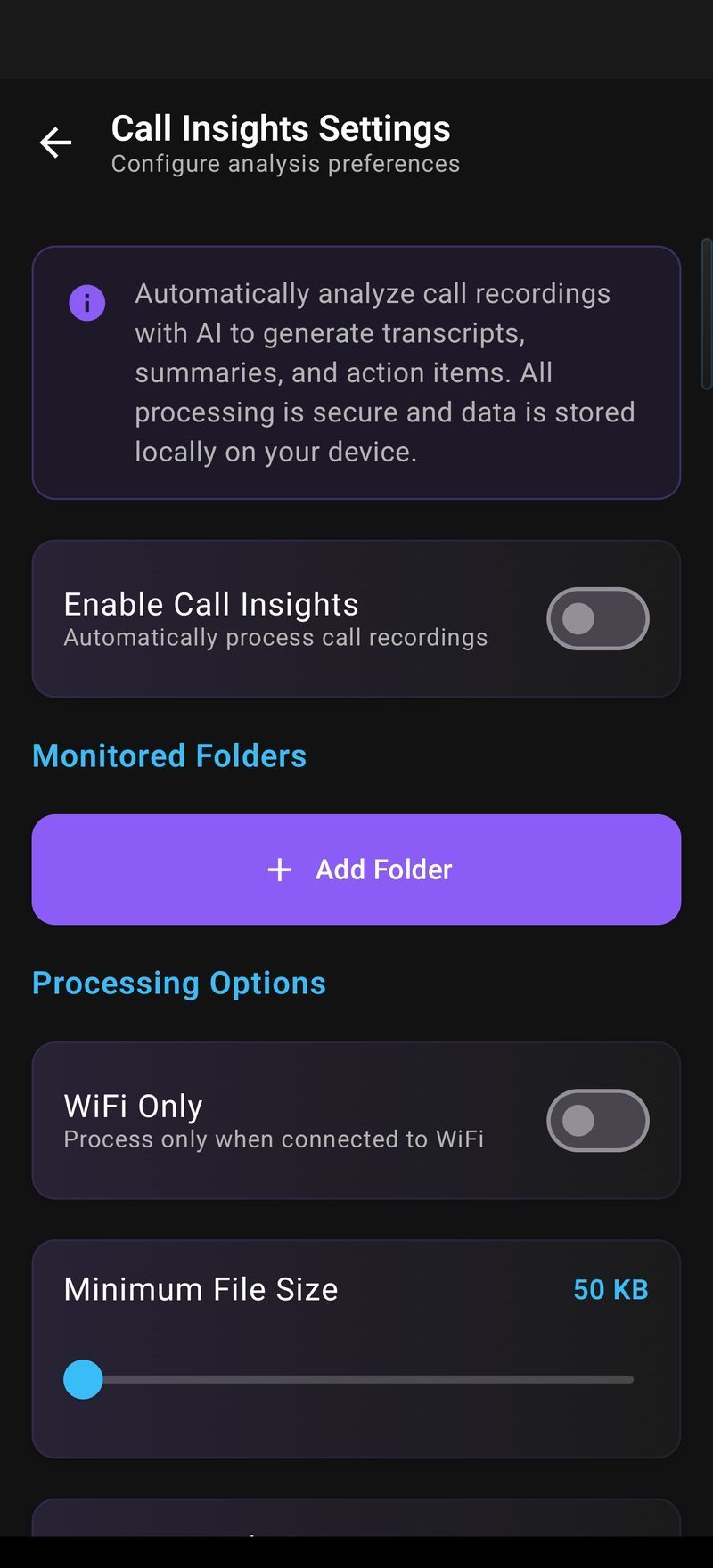
If your phone already records calls (many do, where it's legal), Auto Analysis watches a folder you choose and processes new recordings as they appear. You pick the folder through Android's document picker, grant Arc scoped access to just that folder, and set three things: a file size limit (1–100 MB), a cutoff date so old recordings stay ignored, and a check frequency — every 6, 12, or 24 hours. From then on, new recordings are analyzed in the background and you get a high-priority notification when the report is ready; tapping it opens the call directly.
If a file fails to process, Arc retries up to three times with growing delays before it gives up and tells you — and you can always kick off a manual reprocess. Battery and Doze mode are respected; nothing runs hot in your pocket.
A searchable library of every call.
Every analyzed call is saved to your Call Insights list: title, date, duration, a source badge showing whether it was Manual or Auto, an unread dot if you haven't opened it yet, and a preview of the summary. The list is sorted newest first and grouped under headers like Today, Yesterday, This Week.
The part you'll actually use is search. Tap the search icon and type anything — "deadline", "budget approval", "March 15" — and Arc searches across call titles, transcripts, summaries, and action items. Not "which call was that in," scrolling through recordings; it's "here are the three calls that mention the budget, with the number highlighted."
Reports can be shared from the same screen: the whole report, or just the summary, or just the action items — dropped straight into the Android share sheet for email, Slack, or WhatsApp. The transcript copies out in full with one tap. And when a call stops being relevant, swipe to delete, or long-press for multi-select bulk cleanup, with a confirmation before anything is removed.
New reports also show up in your Unread Queue alongside your summaries and flashcards, marked with a call icon — open it, glance, and it's marked read automatically. One place to triage everything Arc has produced for you.
Your calls, your device, your rules.
An AI note taker for phone calls has to earn trust before it earns anything else, so here is exactly how Call Insights handles your data:
- Explicit consent, always. Nothing is captured until you turn the feature on yourself. Manual Upload means you picked the file. Auto Analysis means you granted access to a specific folder. There is no silent mode.
- Scoped access only. Via Android's Storage Access Framework, Arc can read only the folder you explicitly granted. It cannot browse the rest of your storage, and you can revoke the permission at any time.
- Banking and crypto apps: automatically off. Call Insights auto-disables itself in 200+ banking and crypto apps. Sensitive financial screens never get swept into analysis.
- Transcripts stay on your device. All results — transcripts, summaries, action items — are stored locally in Arc's database. Arc's servers don't hold your call history.
- Ephemeral audio processing. Audio goes to Google's AI service for transcription and isn't permanently stored there. Arc doesn't keep the audio file itself — the insight report is the artifact.
- Optional encrypted backup. Call insights can be included in your Google Drive backup — your choice, off until you turn it on.
- Delete means delete. Individual reports, swipe, or bulk delete with confirmation. Clear all from Settings when you want a clean slate.
Recording laws differ by country and state — some places require everyone on the call to consent. That's exactly why Arc gates everything behind your explicit opt-in: check the rules where you live, and use the controls rather than around them.
Arc vs Otter and Plaud-style bots.
Most AI note takers you've heard of — Otter, Fireflies, and the Plaud-style recorder gadgets — share a design assumption: the meeting matters, the meeting has a calendar invite, and a bot may join it. Arc is built the other way around. There's no participant called "Arc Notes" in your call, nothing to invite, nothing for the other person to wonder about — just your phone doing what phones do, with a record kept.
| Arc | Otter / Plaud-style tools | |
|---|---|---|
| Works on real phone calls | ✅ The core use case | ❌ Meeting apps only |
| No bot joining the call | ✅ Nothing to invite | ❌ Usually a bot or a separate recorder |
| One-tap extractions | ✅ Calendar, contacts, maps, links | ⚠️ Varies by tool |
| Auto mode for recordings folder | ✅ New files processed automatically | ⚠️ Varies; often manual upload |
| Also part of a full assistant | ✅ Summaries, flashcards, TTS, chat | ❌ Notes only |
| Free tier | ✅ Generous | ⚠️ Limited minutes per month |
The fair counterpoint: dedicated meeting tools are excellent inside their ecosystem — calendar sync, team workspaces, CRM integrations. If your calls are Zoom-and-Slack all day and your team shares notes, those tools fit. Arc is for the calls that never appear on a calendar: the contractor's quote, the doctor's instructions, the client who "just had a quick question" that turned into a scope change. It's also part of something bigger — the same app that took your call notes summarizes articles, extracts details from emails, and turns readings into flashcards.
And the price model differs in kind, not just degree. Most AI note takers meter your minutes and upsell before you've finished your first month. Arc's free tier is generous, and the optional premium subscription removes limits — not unlocks the door.
Never take notes on a call again.
Free download. Turn on Call Insights once, and every call is captured.
Get Arc FreeCommon questions
Is the AI note taker free?
Yes — Arc includes free call transcription and summaries with generous daily usage. An optional premium subscription removes limits.
Does it work on regular phone calls, not just meetings?
Yes — that's Arc's difference. It captures your actual phone calls (with your consent, via on-device controls), while most note takers only join scheduled meeting apps. No bot in the call, ever.
Can it create calendar events from the call?
Yes — Smart Extract within Call Insights pulls dates and deadlines from the conversation, and one tap creates a real calendar entry, map pin, contact, or reminder.
Can it process recordings I already have?
Yes — Manual Upload mode accepts MP3, M4A, WAV, AAC, OGG and FLAC files up to 100 MB. Or enable Auto Analysis to process new recordings from a folder you choose, automatically.
Is my call data private?
Transcription results are stored on your device only, calls are processed with your explicit opt-in per mode, folder access is scoped to exactly what you grant, and Arc auto-disables itself in 200+ banking and crypto apps.
Is there an AI note taker for Mac or Windows?
Arc for macOS is available now and captures desktop call apps. The Windows version is coming soon.